Case study · Own SaaS product

Lineplate: technical documentation straight from CAD

A browser app that turns 3D CAD assemblies into clean line drawings, exploded views, ballooned parts lists and multi-page assembly manuals, and keeps them up to date when the design changes. I designed, built and run it end to end.

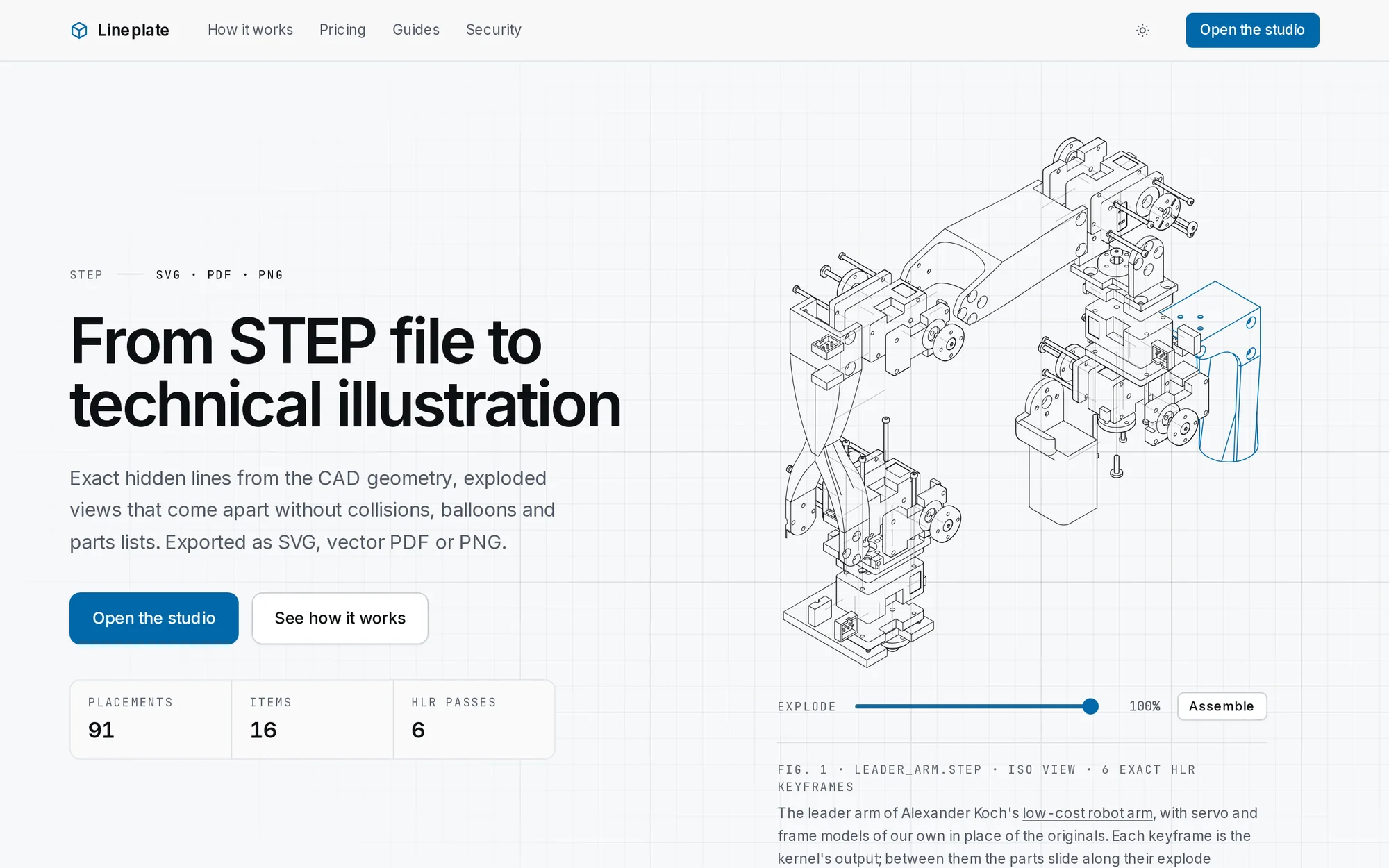
The Lineplate home page: the headline From STEP file to technical illustration beside an exploded line drawing of a robot arm, with an explode slider.
The Lineplate home page. The drawing is live product output, and the slider explodes and reassembles it.
0 uploadsCAD files are processed in the browser and never leave the user's computer
1,683 partsA 3D printer assembly drawn in the browser in about 35 seconds
1.1–2.3×Native speed for exact hidden-line removal, running as WebAssembly
SVG · PDF · PNGTrue vector output, including CMYK and PDF/A for print and archive

The problem

Every manufacturer that ships a product needs assembly instructions, parts diagrams and service manuals. The engineering lives in 3D CAD, but the documentation is usually redrawn by hand in an illustration package, or produced with specialist desktop software that costs thousands a year per seat.

Worse, the work goes stale. When the design changes, the drawings, part numbers and instructions have to be checked and redone, and small teams often simply live with out-of-date manuals.

Lineplate's aim was to take a standard STEP file and produce finished, print-quality documentation in minutes, with nothing to install, and to carry all of that work across when a new revision of the CAD arrives.

What it does

From a STEP file to a finished manual

Each screenshot below is real output from the live product, not a mock-up.

Exact hidden-line drawings

Pick a view and Lineplate computes exactly which edges are visible, hidden or smooth, using an industrial geometry kernel rather than an approximation from a 3D render. Lines are cleaned up into true arcs and curves, so the SVG and PDF exports stay crisp at any size.

It all happens in the studio, in the browser: import a STEP file, choose a view, make a drawing, style it and put it on a sheet at a scale.

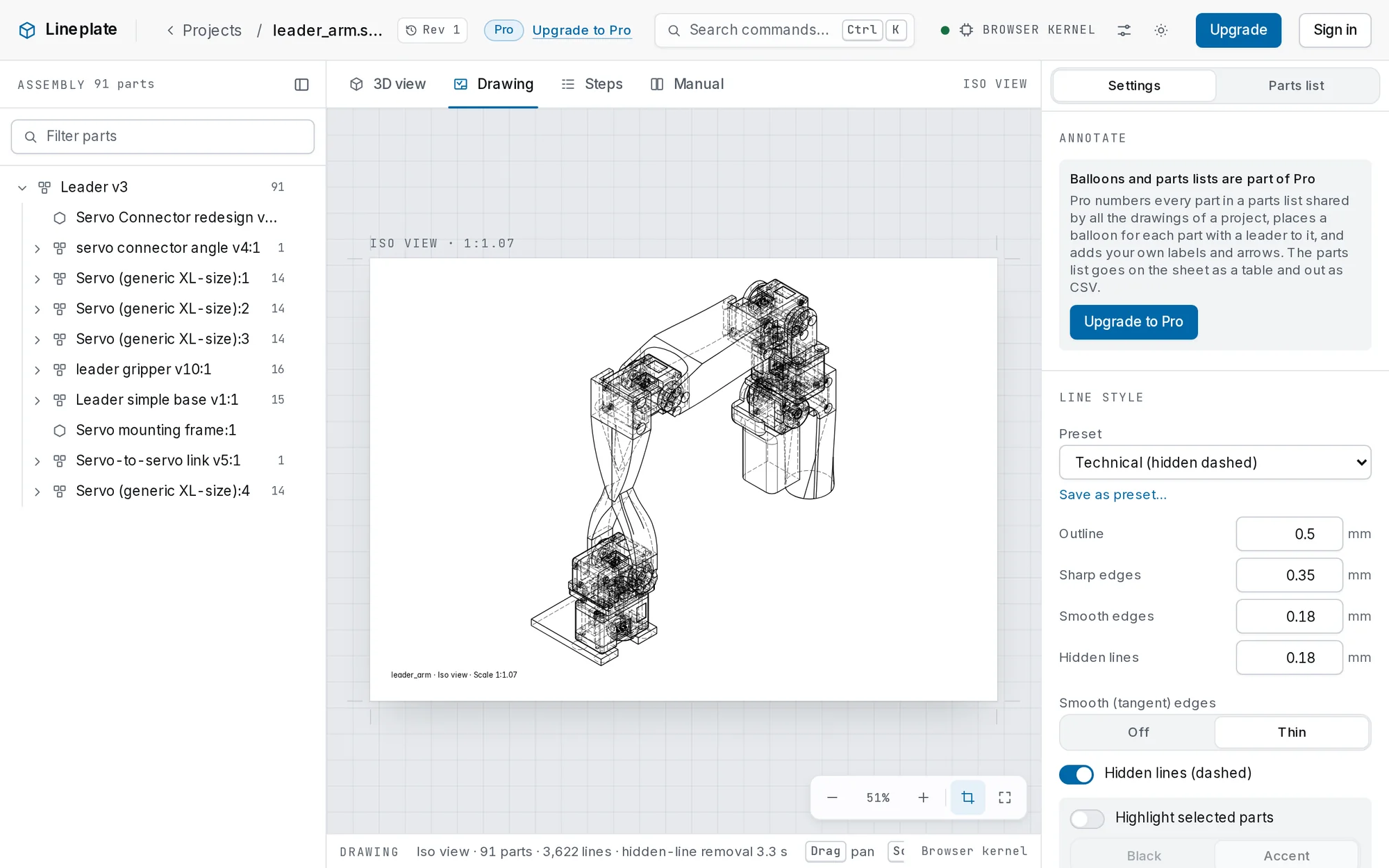
The Lineplate studio in drawing mode: the assembly tree on the left, an iso view hidden-line drawing of a 91-part robot arm on a sheet, and line style settings on the right.
Drawing mode: a 91-part assembly, 3,622 lines, with hidden-line removal done in 3.3 seconds in the browser.

Line styles

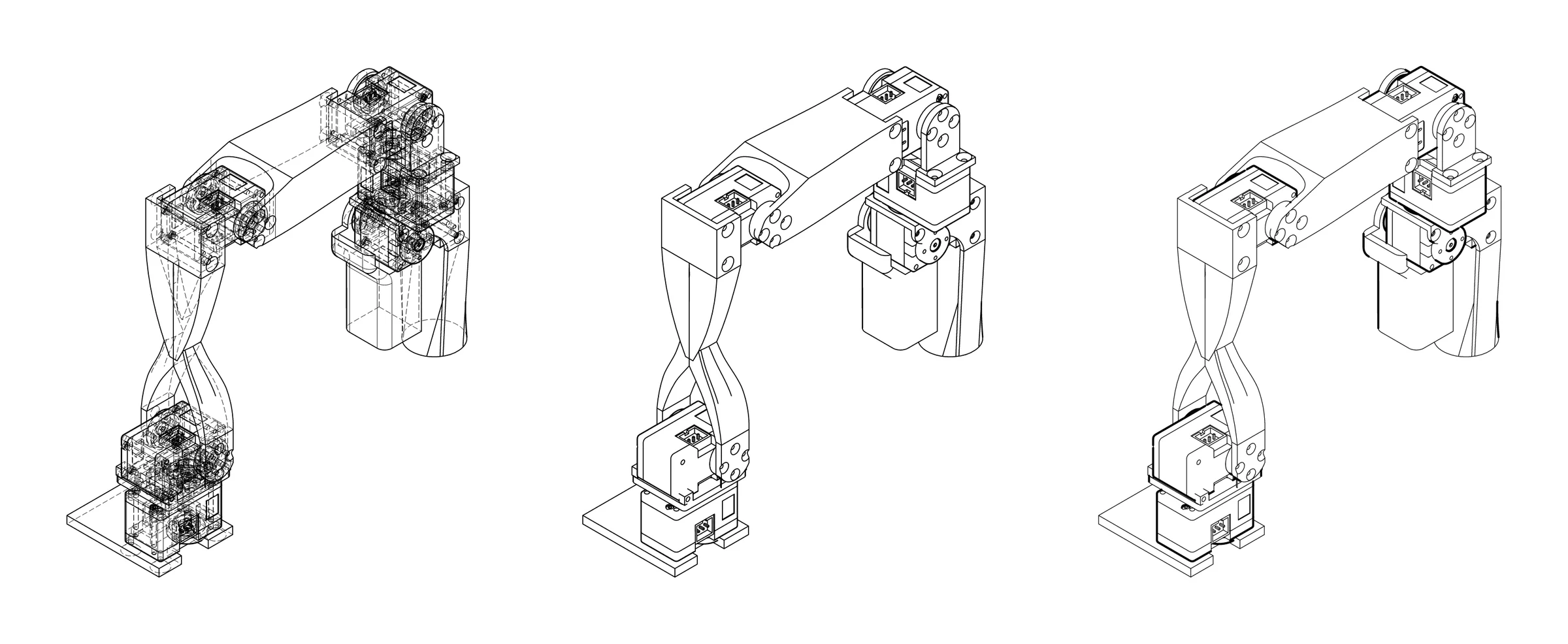
Technical drawings with dashed hidden lines, clean illustration and heavy outlines, with control over every line weight. Restyling never needs the geometry recalculating, so changes show instantly.

Three line drawings of the same robot arm: technical style with hidden lines, illustration style with visible lines only, and heavy outline style.
One view, three line styles.

Automatic exploded views

Auto-explode pulls an assembly apart along straight lines the way an illustrator would, working out which parts touch and checking the result for collisions. It runs in a background worker so the page stays responsive.

Any part can then be dragged, given a new direction or kept together with others, with full undo and redo. Exploded drawings carry the movement trails as standard centre lines.

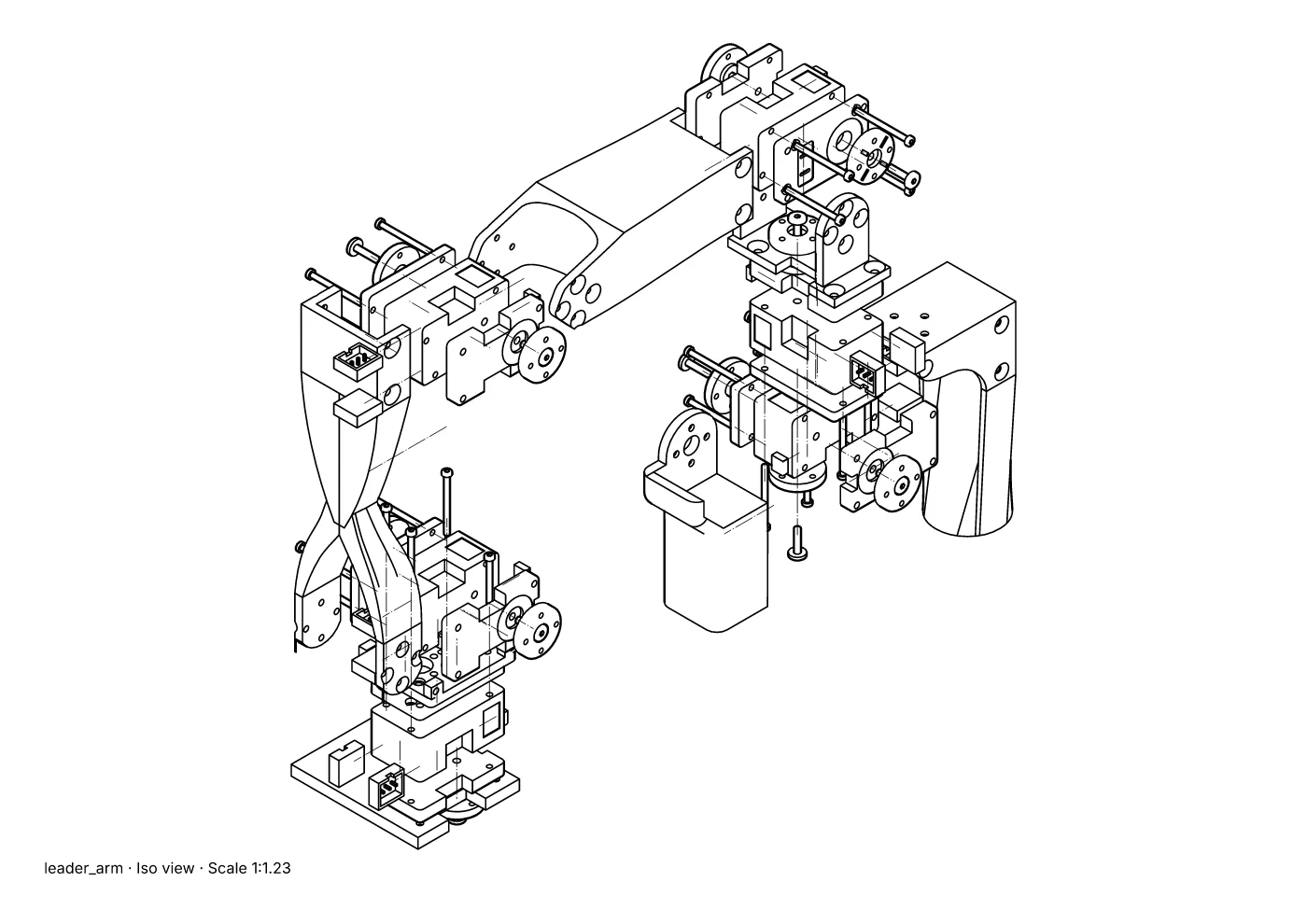
An exploded line drawing of the robot arm, with screws, servo cases and brackets pulled apart along dashed trail lines.
An auto-exploded view with collision checking and movement trails.

Balloons and parts lists

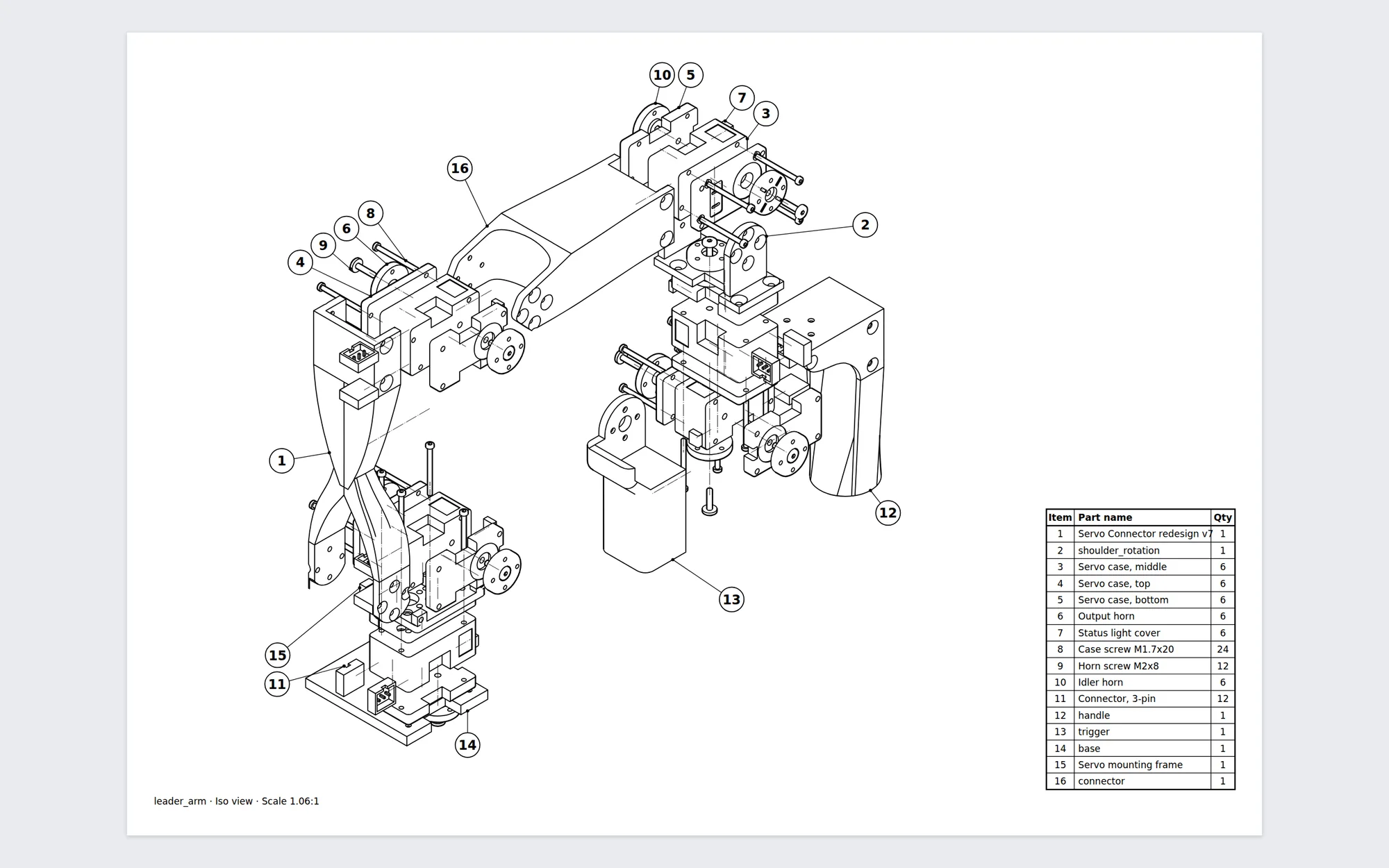
Identical parts are grouped into items with quantities, and bought-in units such as servos are recognised and listed as one line. Balloons are placed automatically around the drawing, spaced evenly, with leader lines that do not cross.

Numbers are shared across every drawing in a project, so renumbering the parts list updates them all. The parts list goes on the sheet as a table and out as CSV.

An exploded drawing of the robot arm with sixteen numbered balloons and leader lines, and a parts list table giving item numbers, part names and quantities.
Auto-placed balloons with no overlaps or crossing leaders, and a matching parts list.

Multi-page assembly manuals

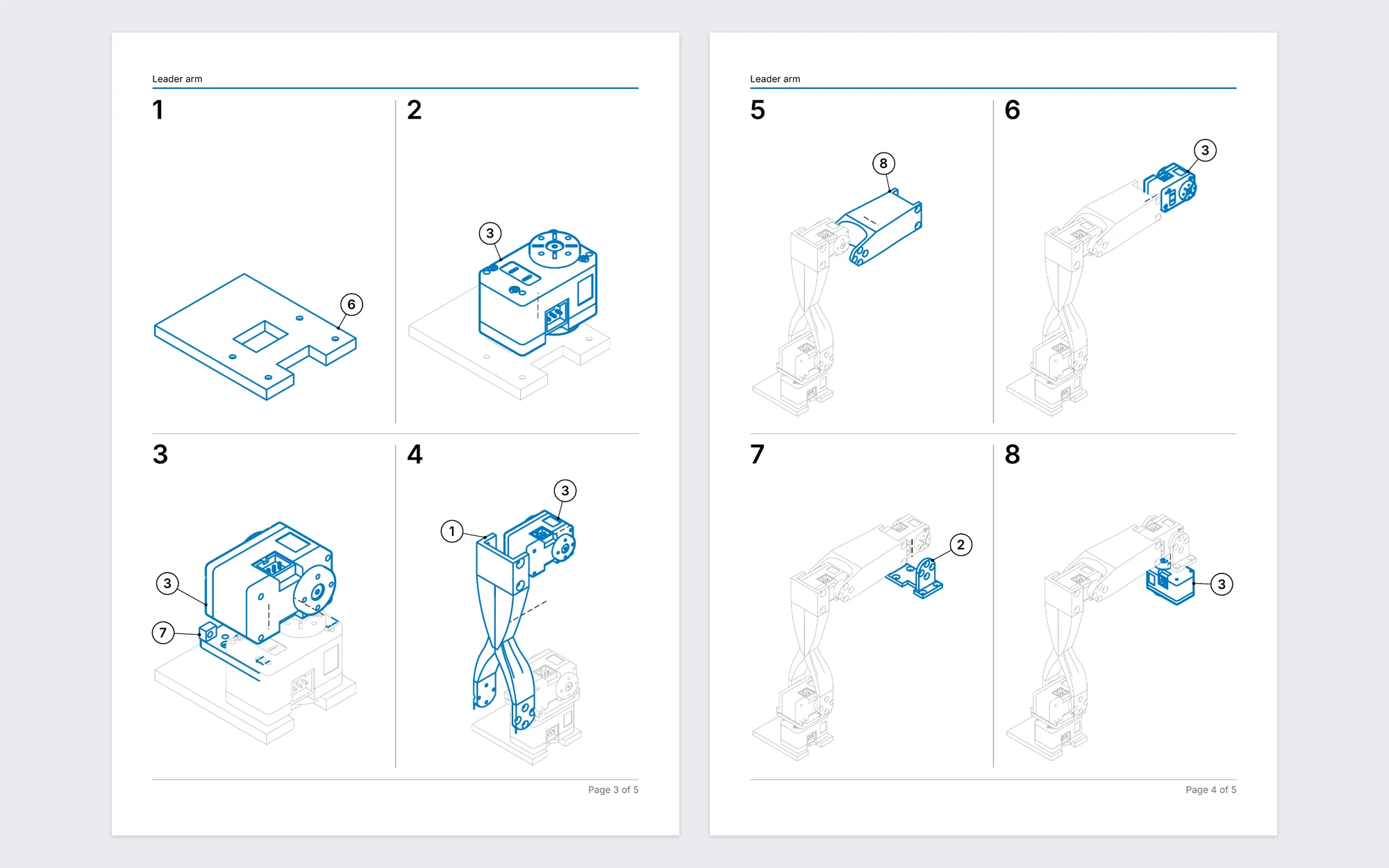
The manual builder works out an assembly sequence from the explosion and draws each step with the new parts highlighted against the ones already fitted.

A manual brings together a cover, a parts list with thumbnails, step grids, the customer's own text and full drawing pages, and exports as a bookmarked PDF that passes PDF/A validation, or as SVG and PNG pages.

Two pages of a generated assembly manual showing eight numbered assembly steps of a robot arm, each with the new parts in blue against the parts already fitted in grey.
Two pages of a generated manual: eight assembly steps, each with its new parts highlighted.

Updating to a new CAD revision

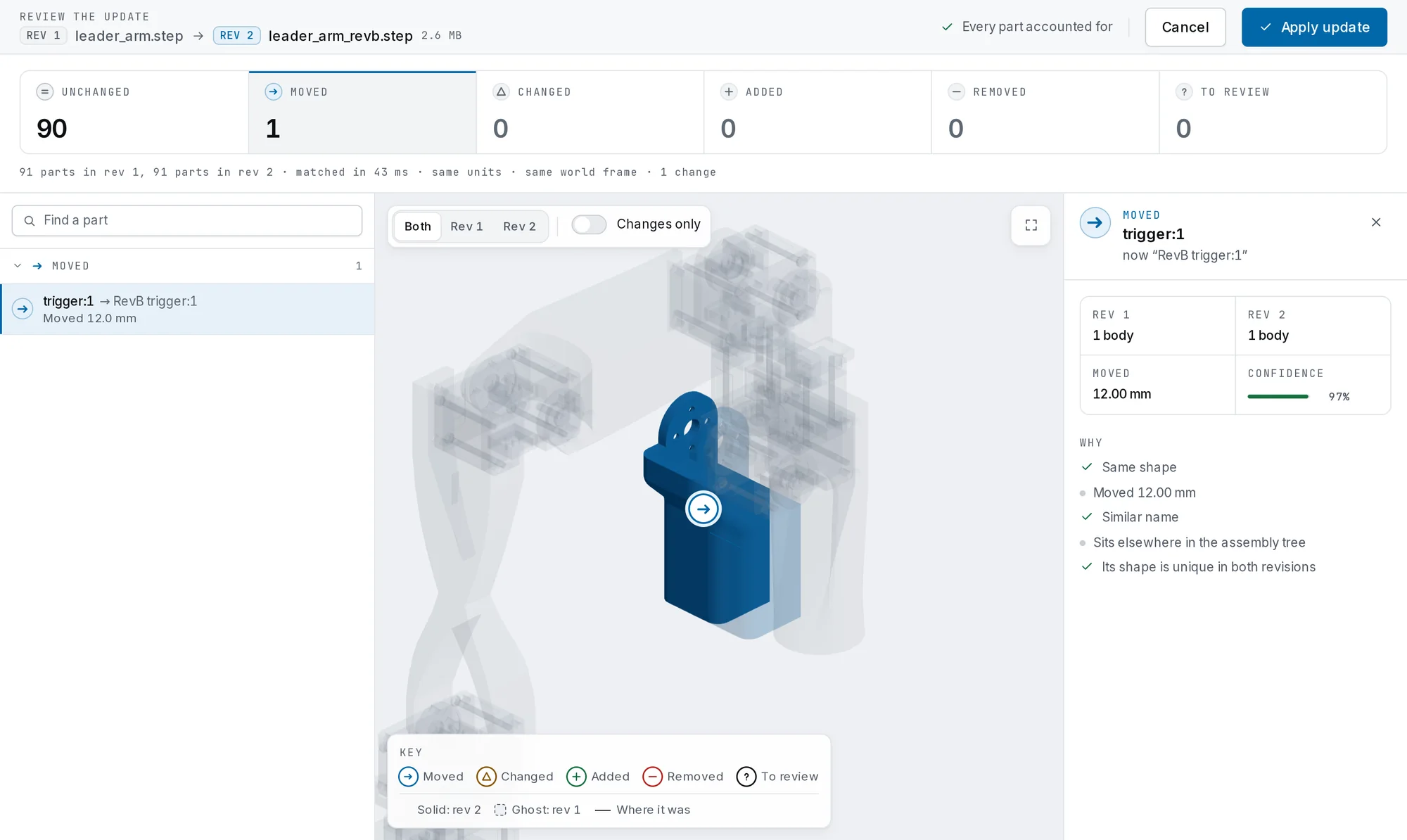
This is the feature that saves the most time. Drop in the new version of the STEP file and every part is matched against the old one: unchanged, moved, changed, added or removed, each with the reasons and a confidence score.

Anything uncertain is reviewed side by side in 3D. Applying the update carries everything across, from balloons and numbering to the exploded view, labels and assembly steps, and earlier revisions stay in a history that can be reverted to.

The revision review screen: a summary of 90 unchanged parts and 1 moved part, a 3D view showing the moved part solid against a ghost of the old revision, and the reasons for the match.
Reviewing a new revision: 91 parts matched, one moved 12 mm, with the reasons for the match.

Branded sheets and batch export

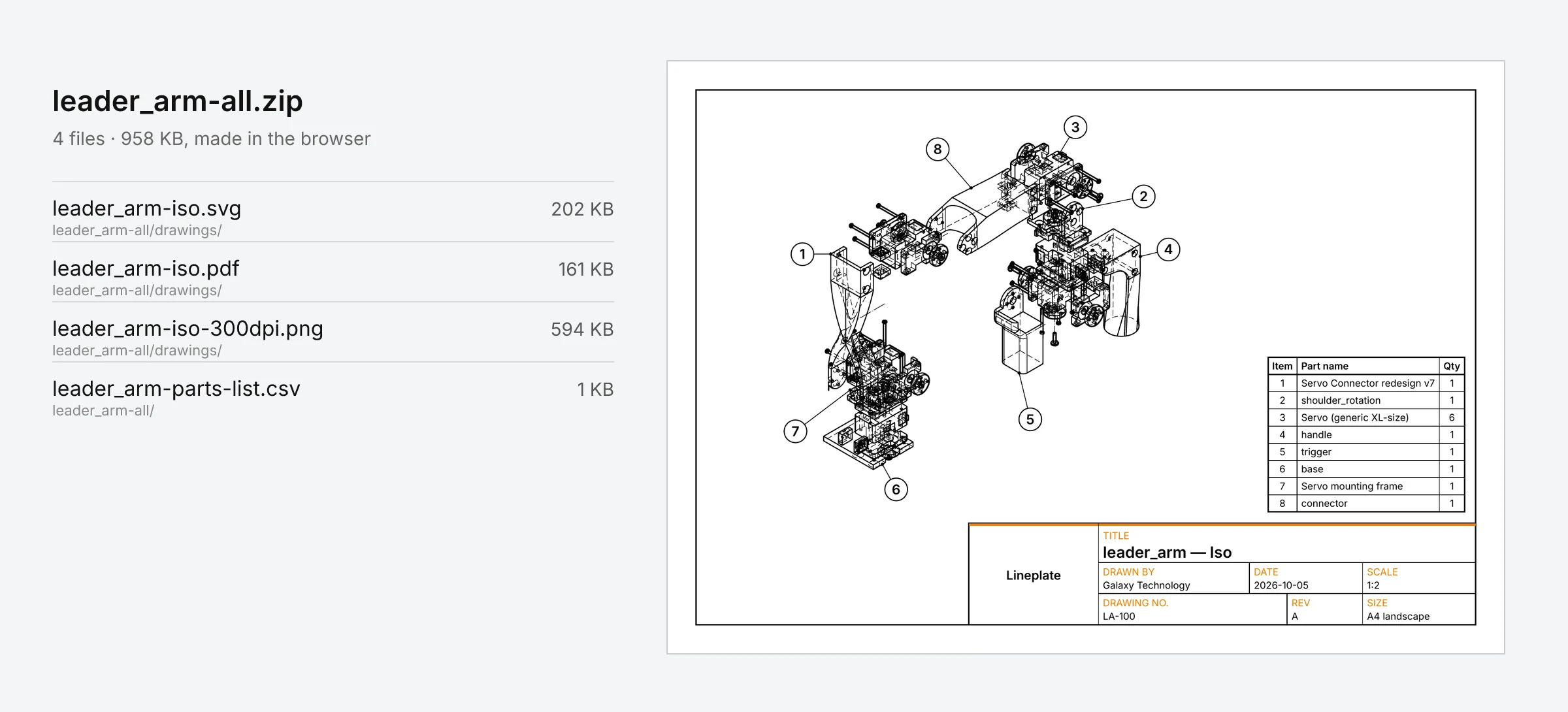
Drawings go onto A4, A3 or Letter sheets at a standard scale, with a branded title block. Batch export produces every drawing, in every format, along with the parts list, as a single zip made in the browser.

A batch export zip listing SVG, PDF, PNG and CSV files, beside an A4 drawing sheet with balloons, a parts list and a title block.
Batch export: SVG, PDF, 300 dpi PNG and the parts list, on a branded sheet.
Engineering

The hard parts

Lineplate is a much bigger build than a typical web app. These are the problems behind it that took the most care.

A CAD kernel in the browser

The Open CASCADE geometry kernel, written in C++, is compiled to WebAssembly and runs in background workers. Exact hidden-line removal runs at 1.1 to 2.3 times native speed, measured against a native build of the same source.

Very large assemblies

Large views are split up: hidden parts are culled, the rest is batched and drawn by a pool of WebAssembly workers sized to the user's machine, then merged. A 1,683-part 3D printer is drawn in about 35 seconds, where a single calculation would take hours.

Private by design

Customers' CAD files are often confidential, so they are read and processed on the user's own computer. Projects, imports and drawings are kept in browser storage, and nothing is uploaded to a server.

Matching parts across revisions

A matcher compares shape, position, name and place in the assembly tree to decide what each part became, handles symmetrical assemblies with a single question, and was proven against a synthetic suite of revisions with known answers before it shipped.

Tests that check the output

Every SVG and PDF test checks what is inside the file, such as path counts, curve types, text and page counts, not just that a file was produced. Exported PDFs are validated with veraPDF.

A full SaaS around it

Accounts, per-editor subscription plans built on Stripe Billing, a free tier with no sign-up, guides, security and open-source pages, and production hosting on Microsoft Azure in the UK behind Cloudflare.

My role

Lineplate is my own product. I did the market research, designed the product and its interface, built the geometry engine, the drawing and manual pipeline and the web app, and set up the hosting, billing and launch. I run it day to day.

It's the kind of work I do for clients: taking a difficult technical problem and turning it into a polished product that real people can use. If you have a product to build, see SaaS and MVP development.

Technology

  • TypeScript
  • Next.js
  • React
  • Three.js
  • C++
  • WebAssembly
  • Open CASCADE
  • Web Workers
  • PostgreSQL
  • Prisma
  • Stripe Billing
  • Docker
  • Microsoft Azure
  • Cloudflare
  • Playwright
  • Vitest

The drawings show the leader arm from Alexander Koch's low-cost robot arm (MIT licence), with servo and frame models made for Lineplate in place of the originals.

Have a project in mind?

Tell me what you're trying to achieve, and I'll reply as soon as I can to say whether it's a fit and what the fixed-price first step costs.

Start a project